Vitaclaris

Know what the doctor said, even from far away.

Keep a parent's or child's records, medications and visits in your own Vitaclaris, share them with family, and know when a dose is missed. Or your parent keeps Vitaclaris on their own iPhone and sends you an update after each result and visit.

Download on the App Store
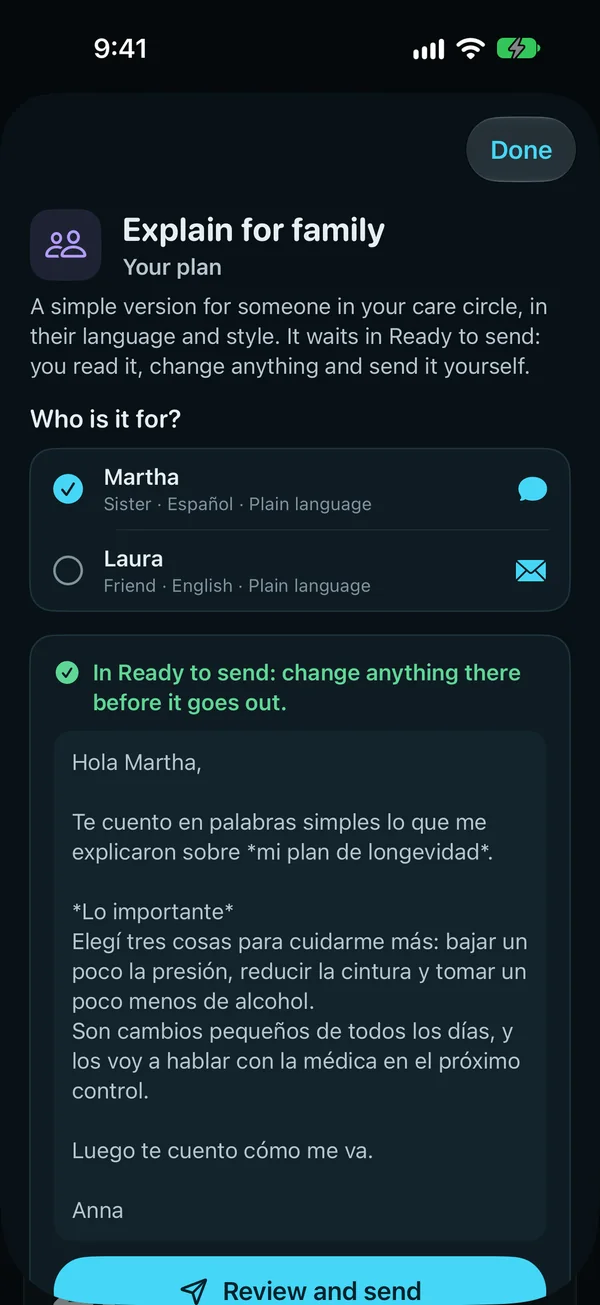
Explain for family, about your plan: a simple version for someone in your care circle, in their language and style; who it's for, a sister who reads Spanish and a friend who reads English, and the note in Spanish, ready to review and send.
Explain for family, in each person's language
Big buttons, just what matters

Simple view

Only what matters today, in big type and big buttons, for a parent or anyone who wants less. The family gets peace of mind, and manages it from their own phone.

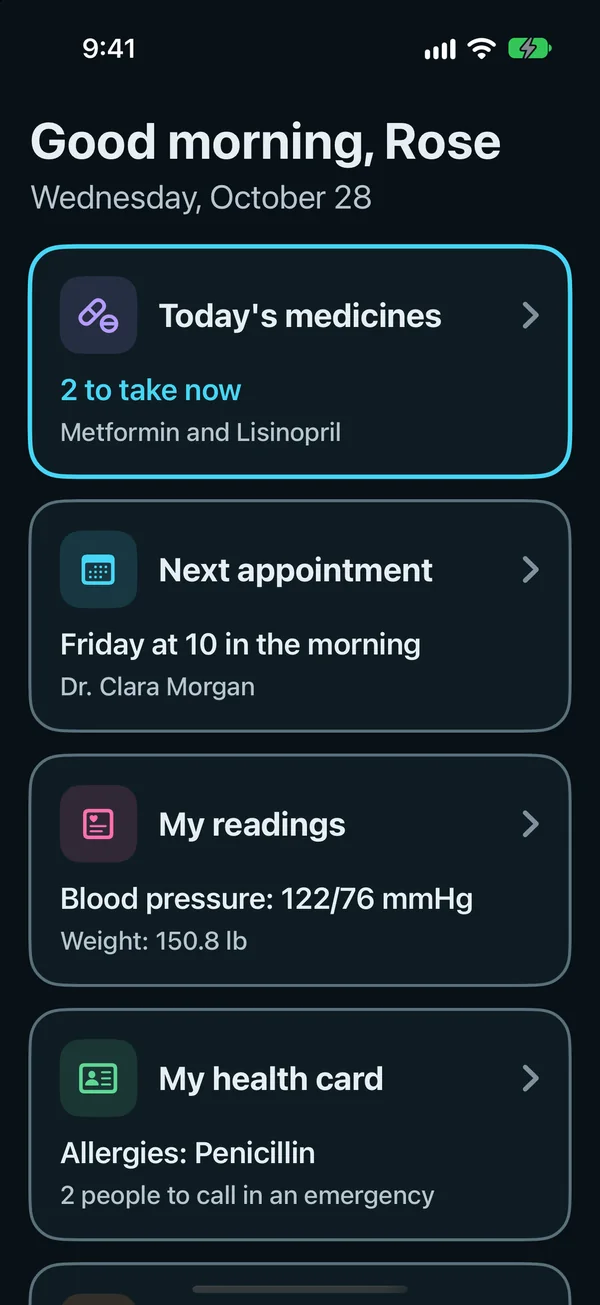
  • Simple view on a parent's iPhone: a good-morning greeting, then four big buttons: Today's medicines, 2 to take now; the next appointment, Monday at 10 in the morning; My readings, blood pressure 122/76 mmHg; and My health card, allergies first.
    Simple view's home

    One home, big buttons

    Today's medicines, the next appointment, readings and the health card, each a big button.

    What's included
    • Big type and big buttons, nothing new to learn.
    • The family's big Call buttons, and I'm OK today.
    • Reminders it can read out loud, a setting you turn on.
    • Works with Assistive Access.
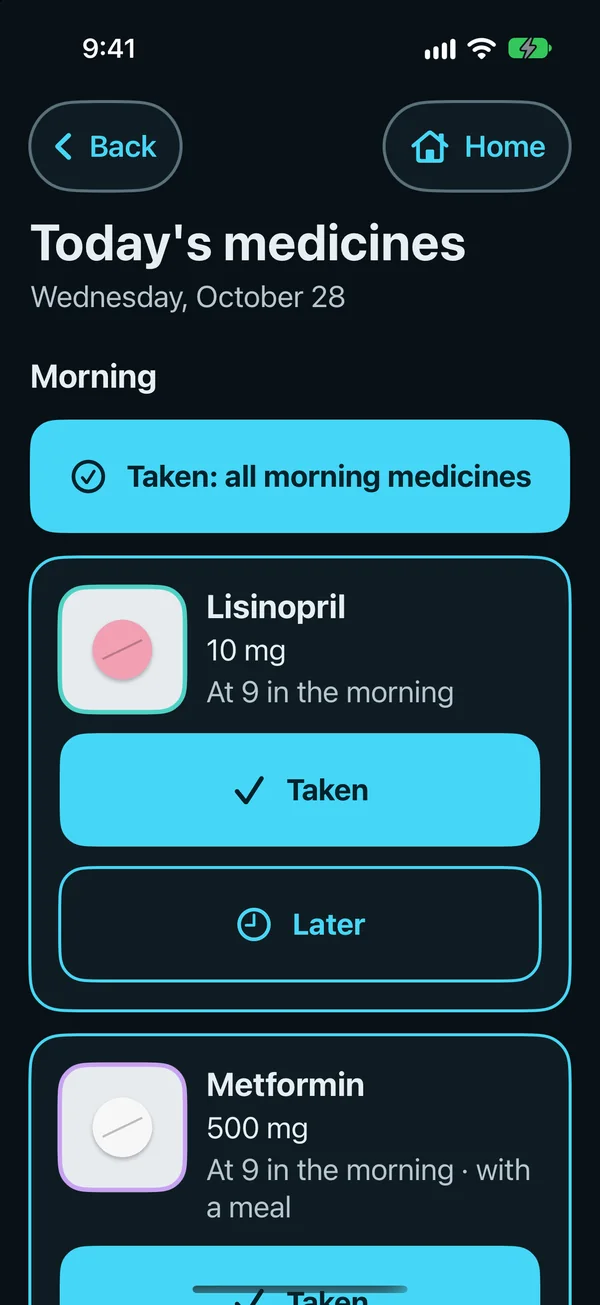
  • Today's medicines in Simple view: Taken for all morning medicines, then Lisinopril 10 mg at 9 in the morning with big Taken and Later buttons, and Metformin 500 mg with a meal.
    Taken, or Later

    Taken, or Later

    One tap marks today's medicine; Later reminds again in 15 minutes, 1 or 2 hours.

    What's included
    • The morning's medicines together, with Taken for all of them.
    • Later reminds again in 15 minutes, 1 or 2 hours.
    • The family sees each dose, with an alert when one is missed.*1
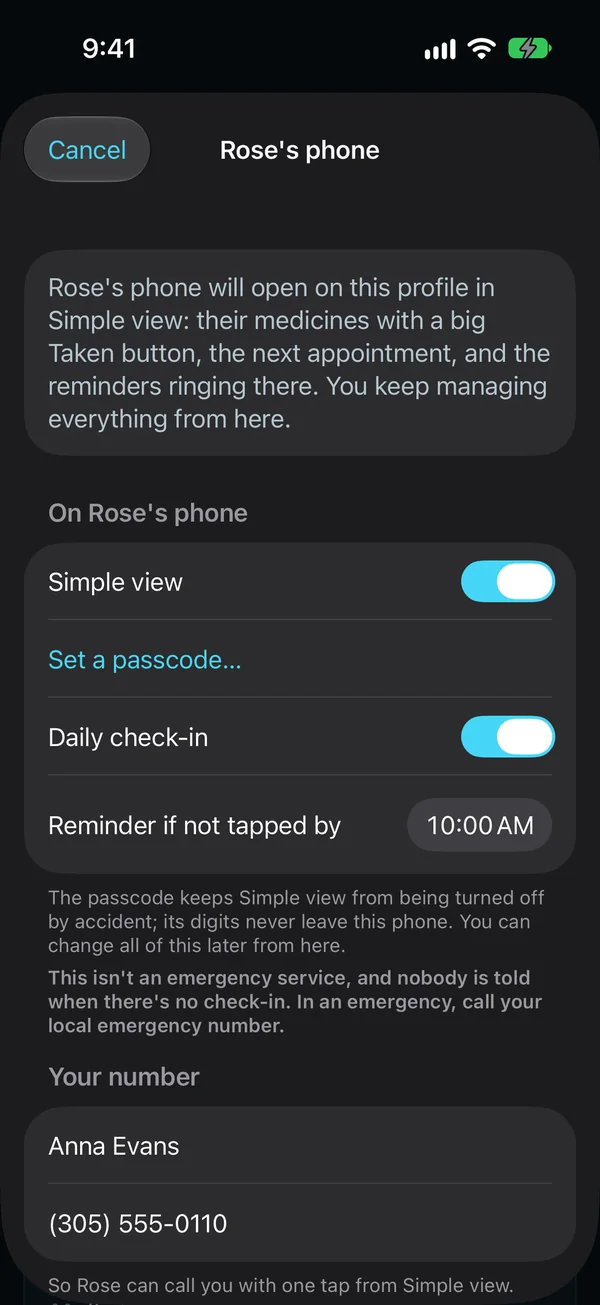
  • Setting up a parent's phone from yours: it will open on their profile in Simple view, with Simple view and the daily check-in turned on, a reminder if it isn't tapped by 10:00 AM, and your number for one-tap calls.
    Setting up a parent's phone from yours

    Set up from your phone in minutes

    Set up a parent's iPhone from yours, with a passcode so Simple view stays on.

    What's included
    • Set up from your own iPhone, with a passcode so Simple view stays on.
    • Big buttons for today's medicines, the next appointment, readings and the health card.
    • Their family's numbers as big Call buttons.
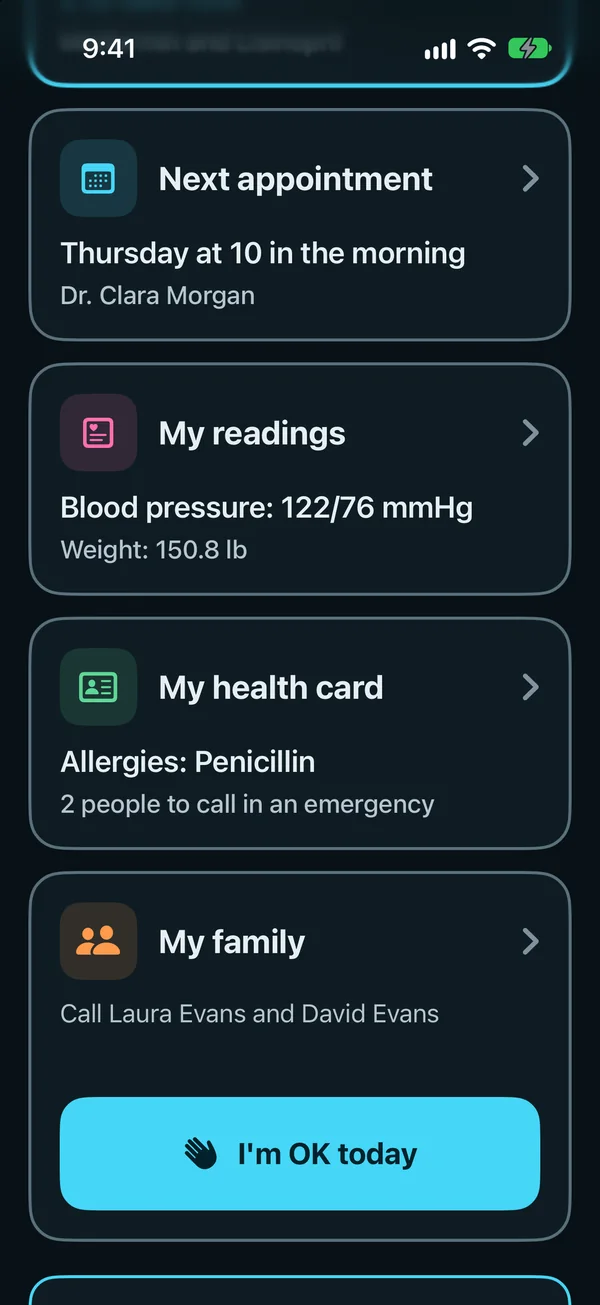
  • Simple view on a parent's own phone: the next appointment on Thursday at 10 in the morning, her readings, her health card with an allergy and two people to call, the family's Call tile, and the big I'm OK today button.
    I'm OK today, on the parent's phone

    I'm OK today

    A daily tap the family sees, with a gentle reminder.*3

    What's included
    • One tap a day: I'm OK today, with a gentle reminder if it isn't tapped.
    • The family sees on their phones that it's done.*2
  • Show to a doctor

    Allergies first, then conditions, medicines and who to call in an emergency.

  • Out loud, and Assistive Access

    Reminders read out in the phone's voice, and Simple view straight away with Assistive Access.

How it works for a family

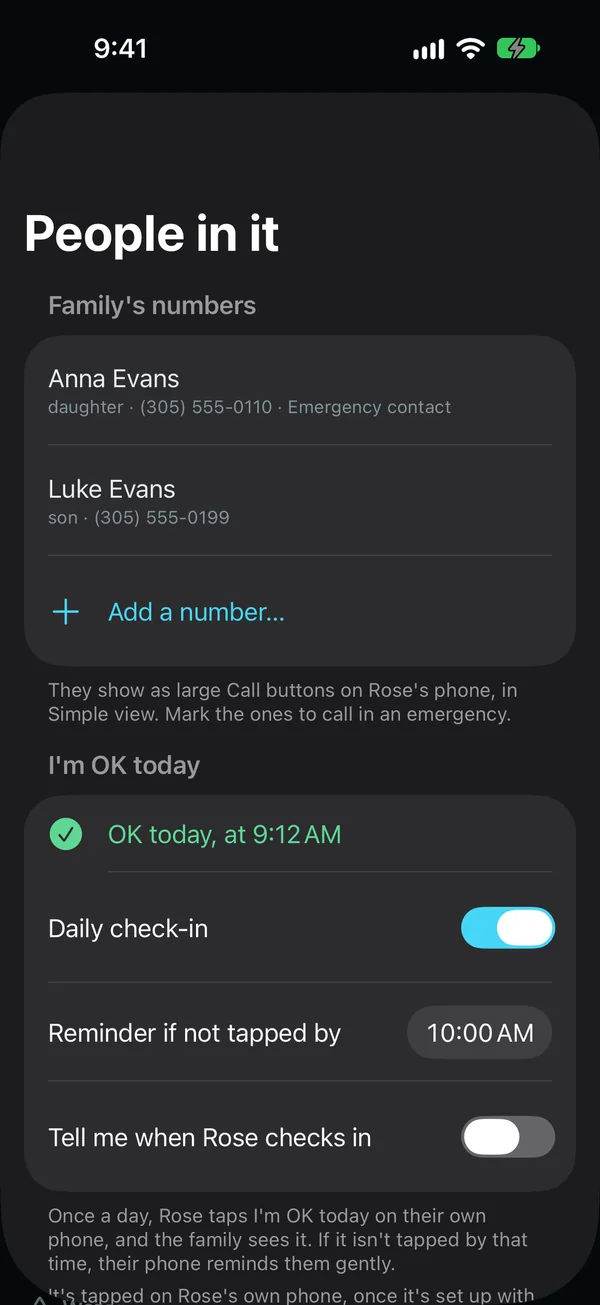
  • A parent's profile on the family's phone: the family's numbers, her daughter as the emergency contact and her son, shown as large Call buttons on her phone, and I'm OK today, tapped at 9:12 AM, with the daily check-in on.
    A parent's profile, on the family's phone

    A profile for each person you care for

    Their records, medications, visits and family numbers in your own app, shared with family, end-to-end encrypted.

    What's included
    • Their records, medications, visits and family numbers in your own app.
    • Shared with a brother or sister, end-to-end encrypted, so everyone sees the same.
    • Missed-dose alerts on the family's phones.*1
    • Switch profiles from the top of any tab.
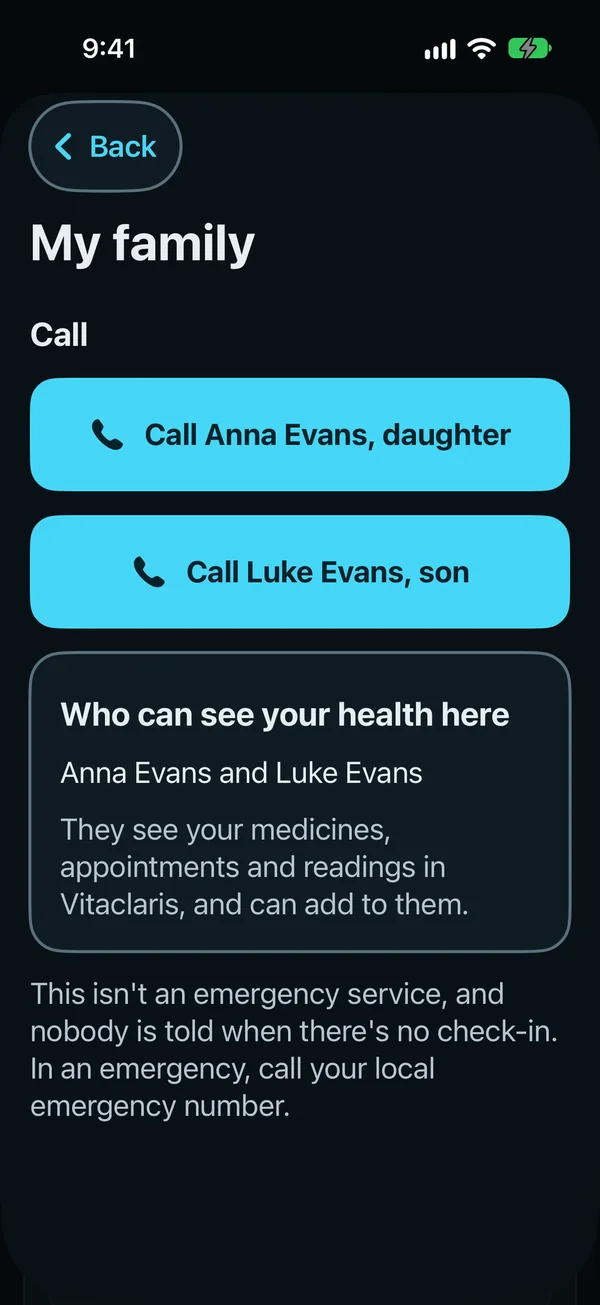
  • My family on a parent's phone: big buttons to call her daughter and her son; who can see her health here; and that it isn't an emergency service.
    My family, on a parent's phone

    Their family, one tap away

    On their phone, big buttons to call the family, and who can see their health, in plain words.

    What's included
    • Big Call buttons for the family, on their phone.
    • Who can see their health, in plain words.
    • Set up from your own phone.
  • An alert when a dose is missed

    Family members who turn it on get a short alert: who, which dose and when.*4

  • Updates for your care circle

    After each result or visit, Vitaclaris drafts a short update for each person, in their language. Nothing goes out until it's read and sent from Mail or WhatsApp.*5

  • A summary on a schedule

    A daily or weekly summary for each person, with what's new, the questions for the doctors and every open item.*5

  • Explain for family

    With Vitaclaris Plus, an explanation can be rewritten for someone in the family, in their language.

Adding a profile asks you to confirm that you care for that person or that they agreed. The Health app from Apple is read only for the phone's owner, never for a family profile. Names, emails and phone numbers stay on the iPhone: Claude gets each person's relationship, language and style, never their names.

Family profiles, sharing them and the alerts are free. Reading reports and writing updates and summaries use Vitaclaris Plus.

Illustrative example, not a real user. Sample data.

Laura, 52, in Chicago

Her father, 78, lives in Florida and sees three specialists.

  • Her father keeps his records in Vitaclaris on his own iPhone, with Laura and her brother in his care circle.
  • The evening after his cardiology visit, he sends Laura an update by email: what the doctor changed, why it matters, and the two questions still open for the next visit.
  • Her brother gets the same news by WhatsApp.
Illustrative example, not a real user. Sample data.

Ana, 47, in Houston

She keeps her mother's profile in her own Vitaclaris; her mother, 74, lives in Monterrey.

  • Ana shares the profile with her brother in Monterrey, who goes to the visits.
  • Her mother's lab reports are in Spanish. With Vitaclaris Plus, Claude reads them, and each result lines up with its lab's own range.
  • When an evening dose is missed, both of them get an alert.*4
Illustrative example, not a real user. Sample data.

David, 41, in Phoenix

He keeps his daughter's profile, shared with her mother.

  • Her vaccines, visits and medications are in one place, on both parents' phones.*6
  • Before each checkup, What changed shows what's new since the last one.
  • Her pediatrician gets a doctor link instead of a stack of forms.

Questions

Is Vitaclaris free?

Yes. Everything that runs on your iPhone is free, with no time limit: your records, medications, visits, the doctor link, family profiles, the programs, the estimates, your plan and the AI on your iPhone. Vitaclaris Plus adds Claude for $9.99 a month or $79.99 a year, with a free week the first time. Cancel at any time in your iPhone's Settings.

What can the AI do?

On iPhones with Apple Intelligence, some things are written right on the phone, for free, and nothing leaves it. With Vitaclaris Plus, Claude reads your documents, explains results, reports and medications, prepares your visits, summarizes a recorded visit and answers questions about your own health. See everything it does.

Can I keep my mom's or my child's records?

Yes. Add a family profile for each person you care for, with their records, medications and visits, in your own Vitaclaris. Share a profile with family so everyone sees the same thing, and get an alert when a dose is missed. The Health app from Apple stays yours alone.

What are blood age and the heart risk estimate?

Estimates from published research, from results you already have: blood age uses a research formula (PhenoAge) with nine routine blood values and your age, for adults from 20 to 100, and the 10-year heart risk estimate uses the PREVENT equations, made for ages 30 to 79 without a past heart or blood vessel problem. They aren't medical tests: ask your doctor what they mean for you.

Where does my health information go?

It stays on your iPhone and iPad. If you turn on sync, your devices share an end-to-end encrypted copy that only your devices and your recovery key can open. When you use an AI feature, what it needs goes through our server to Anthropic's Claude, and our server keeps none of it. See everything that leaves your device.

Which doctors and hospitals does it work with?

Any of them: add a lab report or a letter as a PDF or a photo, in any language, and with Vitaclaris Plus, Claude reads it into results and to-dos. In the US, the UK and Canada, Vitaclaris can also read the records your hospitals, clinics and labs send to the Health app from Apple. Apple's directory lists more than 18,600 US hospitals, clinics, practices and labs.

Is it in Spanish?

Yes. The app, its help and this site are in English and Spanish, and each person in your care circle gets updates in their own language.

Which iPhones and iPads does it run on?

Any that run iOS 26 or iPadOS 26: iPhone 11 and later, iPhone SE (2nd generation) and later, iPad (8th generation) and later, iPad mini (5th generation) and later, iPad Air (3rd generation) and later, and every iPad Pro from 2018 on. Its Apple Watch app needs watchOS 26 or later.

Does Vitaclaris replace my doctor?

No. Vitaclaris shows what your lab reports, with the lab's own flags and ranges, and helps you prepare your questions. What a result means for you is for your doctor to say, and what Claude writes isn't medical advice.

Get Vitaclaris

Download it, hear about what's new, or tell us what you'd like next.

Download

Vitaclaris: Health & Longevity, free on the App Store, for iPhone and iPad.

Download on the App Store
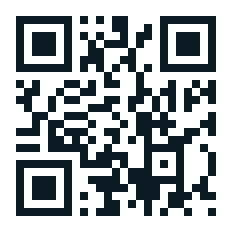
QR code for vitaclaris.com/get
On a computer? Scan this with your iPhone's camera, or go to vitaclaris.com/get.

Get updates

News about Vitaclaris, such as new versions and features.

We use your email only for Vitaclaris's news, never share or sell it, and take you off the list whenever you ask. Privacy Policy

Suggest a feature

What should Vitaclaris do next?

Write a suggestion

Please don't include personal health information. We may use the ideas you send to improve Vitaclaris, without owing you anything for them. Privacy Policy

VitaclarisUpdatesGet the app