Vitaclaris

Every doctor has a piece. Vitaclaris keeps the whole story.

Your results from every lab, your medications and your questions for each doctor in one place, so each visit picks up where the last one left off.

Download on the App Store
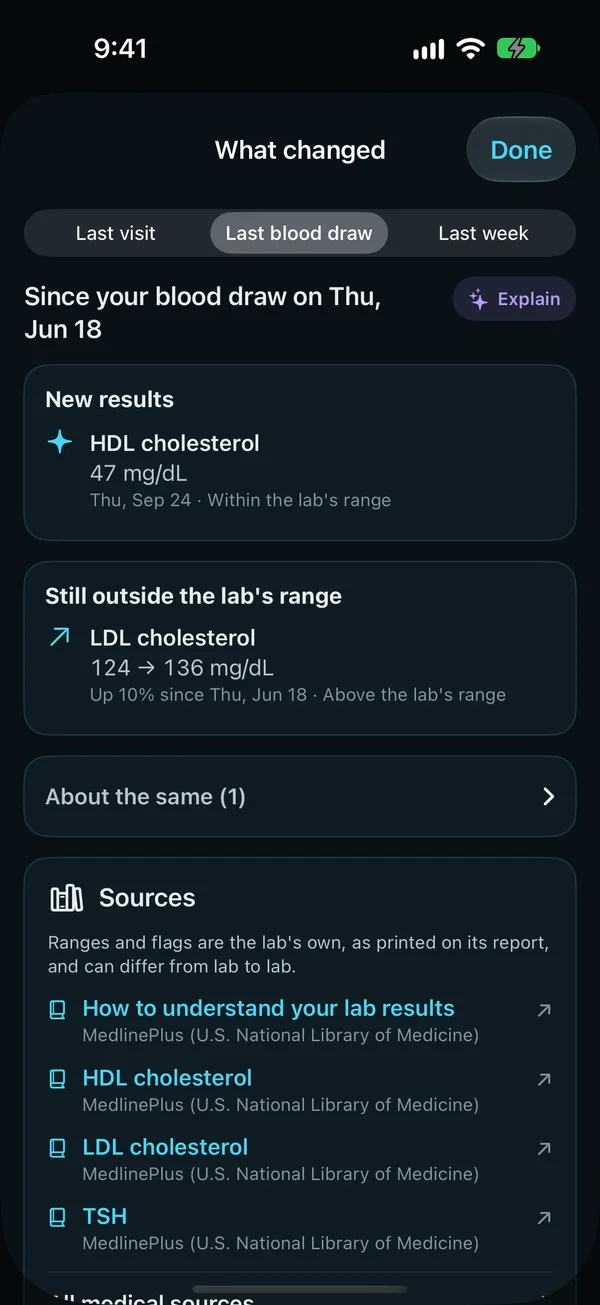
What changed since the last blood draw: a new HDL cholesterol result within the lab's range, LDL cholesterol still outside it, from 124 to 136 mg/dL, up 10%, and the sources for each result.
What changed since your blood draw

What it does for you

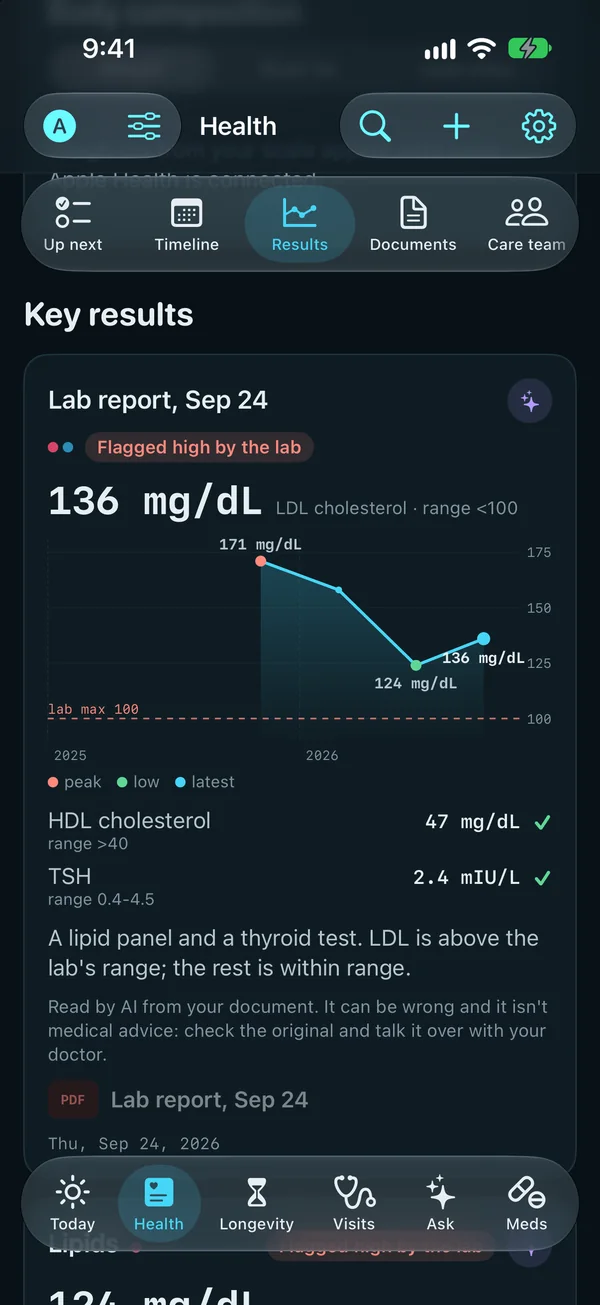
  • Health, Key results: a lab report's LDL cholesterol, 136 mg/dL, flagged high by the lab and charted with its earlier values and the lab's limit of 100; HDL cholesterol and TSH within range.
    A result with the lab's own range

    Every result, with its lab's own range

    Records from your providers and the reports you add line up on one chart, with the flags and ranges each lab printed.

    What's included
    • Records from your providers and the reports you add, on one chart.
    • The flags and ranges each lab printed.
    • Each result's history over time.
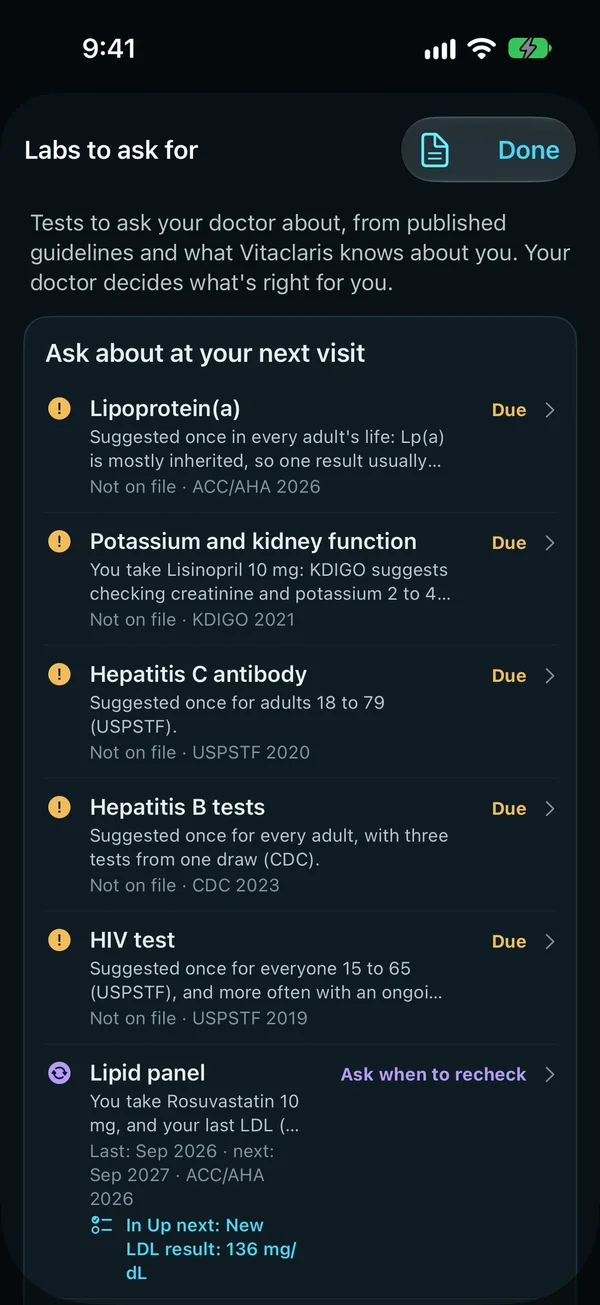
  • Labs to ask for: tests to ask your doctor about, from published guidelines and what Vitaclaris knows about you. To ask about at your next visit, each with its reason and its source: lipoprotein(a), potassium and kidney function, hepatitis C and B, and HIV, none on file yet; then the lipid panel and HbA1c, with a note to ask when to recheck.
    Labs to ask for, each with its reason

    Labs to ask for

    Which tests to ask about, from your age, history and last results, with a request sheet and where to get them done.

    What's included
    • Each test with why it's suggested, when it was last done and its source.
    • Ask about at your next visit, to talk over with your doctor, and the ones up to date.
    • Add one to a doctor's agenda, or record a test you had elsewhere.
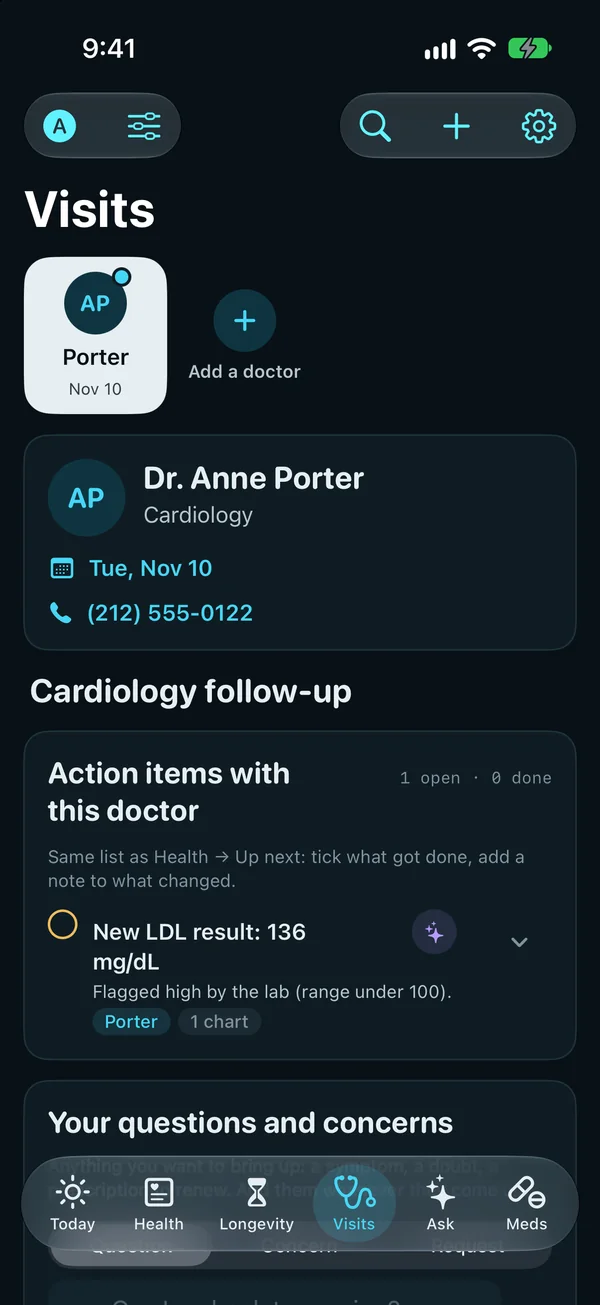
  • Visits: a cardiologist's page, with the next visit on Tuesday, November 10, the cardiology follow-up's action items, first a new LDL result flagged high by the lab, and a place for your questions.
    What's still to do with this doctor

    Follow-ups after every visit

    What each visit left to do, with its due date and a reminder.

    What's included
    • Nothing the doctor asked for gets forgotten: each to-do with its due date and a reminder that morning.
    • At the top of Visits, on Today when it's due, and in Your plan.
    • Overdue ones say so, and each waits on that doctor's page for the next visit.
    • Example: “Repeat HbA1c” due January 15, with a reminder that morning.
  • What changed since your last visit

    New results, medication changes and documents since you last saw that doctor, before you walk in.

Everything here runs on your iPhone and is free, except Claude's readings and summaries, which come with Vitaclaris Plus.

Share your questions with the doctor

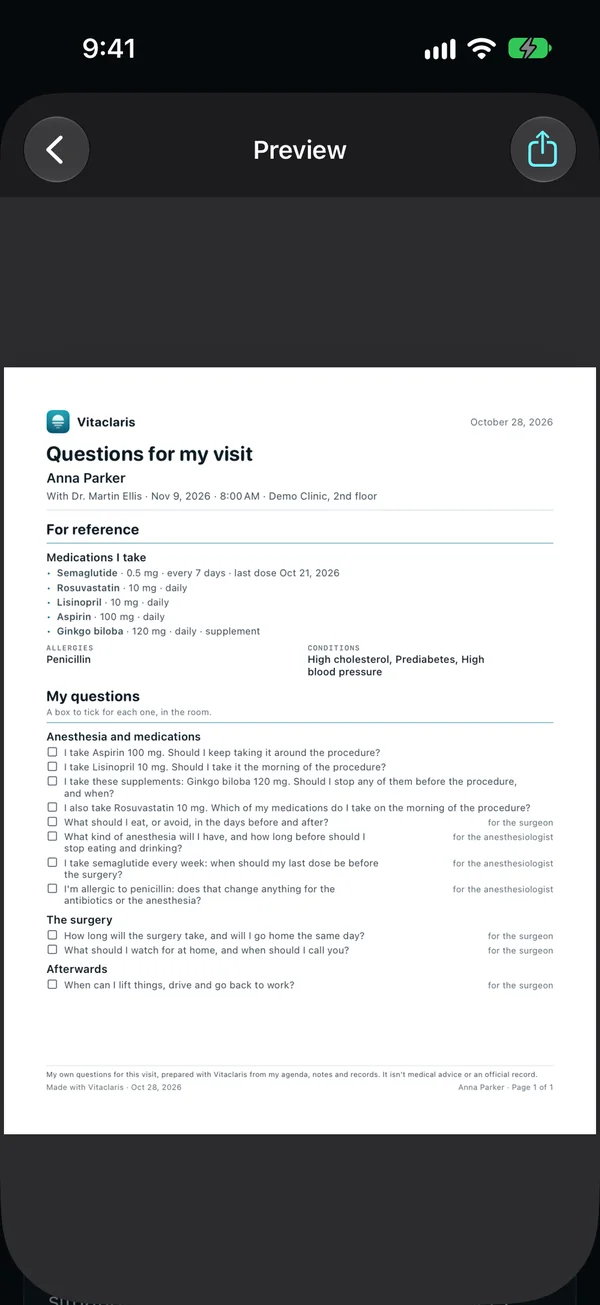
All your open questions for a visit on one page, to print, send or show. On the doctor's page in Visits, tap Share my questions (in a procedure's prep, Share questions at the top) and choose English or Spanish.

  • Each question once, from the agenda, the procedure's prep, your own and your to-dos, with a box to tick in the room; with a procedure ahead, in three parts: anesthesia and medications, the surgery, and afterwards. Ones already asked or marked Not needed stay out.
  • Above them, the visit's date, time and place, then, once: your medications (with the last dose of one you don't take daily), allergies, conditions and the agenda's key facts.
  • Consolidate questions combines the ones that ask the same thing: Claude with Vitaclaris Plus or, without Plus or offline, Apple Intelligence on an iPhone that has it. Nothing changes until you review each one (Accept, Edit or Keep separate) and save.
Share my questions: a one-page sheet for a visit, with its date and place, medications, allergies and conditions, and every open question with a box to tick.
Your questions on one page

Record the visit, with everyone's consent

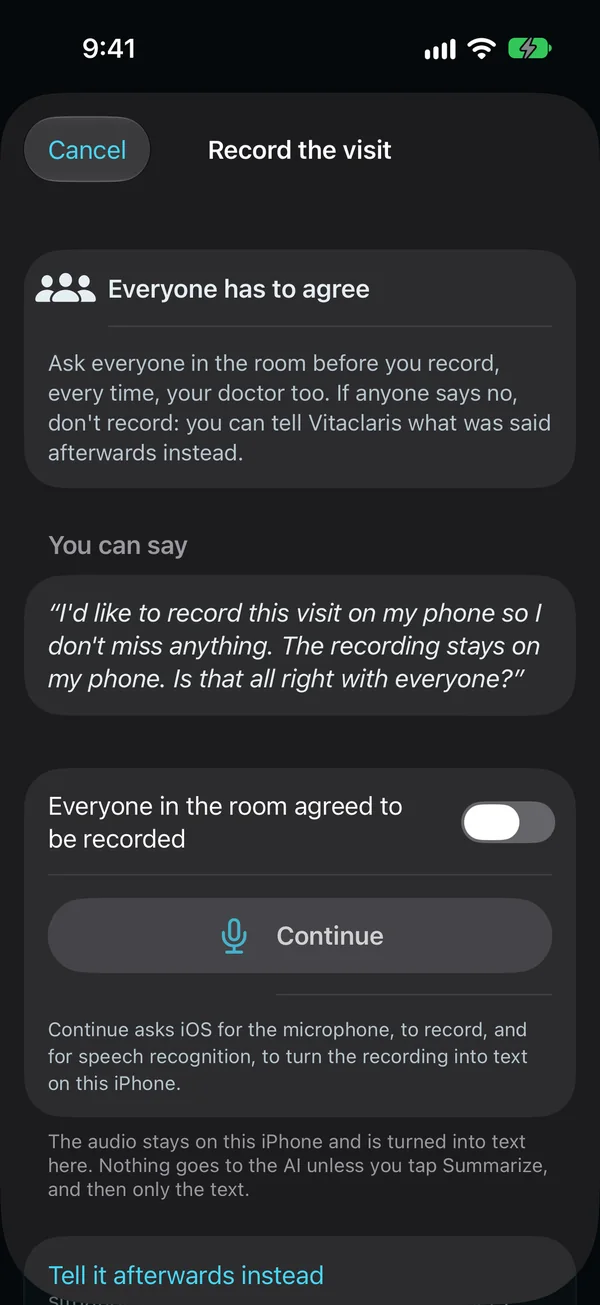
Ask everyone in the room before you record, every time, your doctor too. If anyone says no, don't record: you can tell Vitaclaris what was said afterwards instead.

  • It stays on your iPhone The audio is turned into text on the phone. It isn't backed up or synced, and it's deleted once you save the summary, unless you choose to keep it.
  • You choose when it's summarized Nothing goes to the AI unless you tap Summarize, and then only the text. A short visit is summarized on the iPhone with Apple Intelligence, for free; a longer one by Claude, with Vitaclaris Plus (3 questions).
  • You review it Medication changes go to Meds only when you save them, and the to-dos become follow-ups that remind you until they're done.
Record the visit: everyone has to agree, with words you can say to ask, a switch to confirm everyone in the room agreed, and the audio stays on this iPhone.
Everyone agrees first
Illustrative example, not a real user. Sample data.

Robert, 63

He sees a primary care doctor, a cardiologist, a kidney specialist and an endocrinologist, and takes five medications.

Before: four patient portals, a paper list of pills in his wallet, and the question he meant to ask, remembered in the parking lot.

  • His kidney results from two different labs sit on one chart, each with the range its lab printed.
  • Before his yearly checkup, Labs to ask for lists the tests that are due, and he shares the request sheet with his doctor.
  • With everyone's agreement, he records his visit with his kidney specialist; the notes and two follow-ups land on her page.
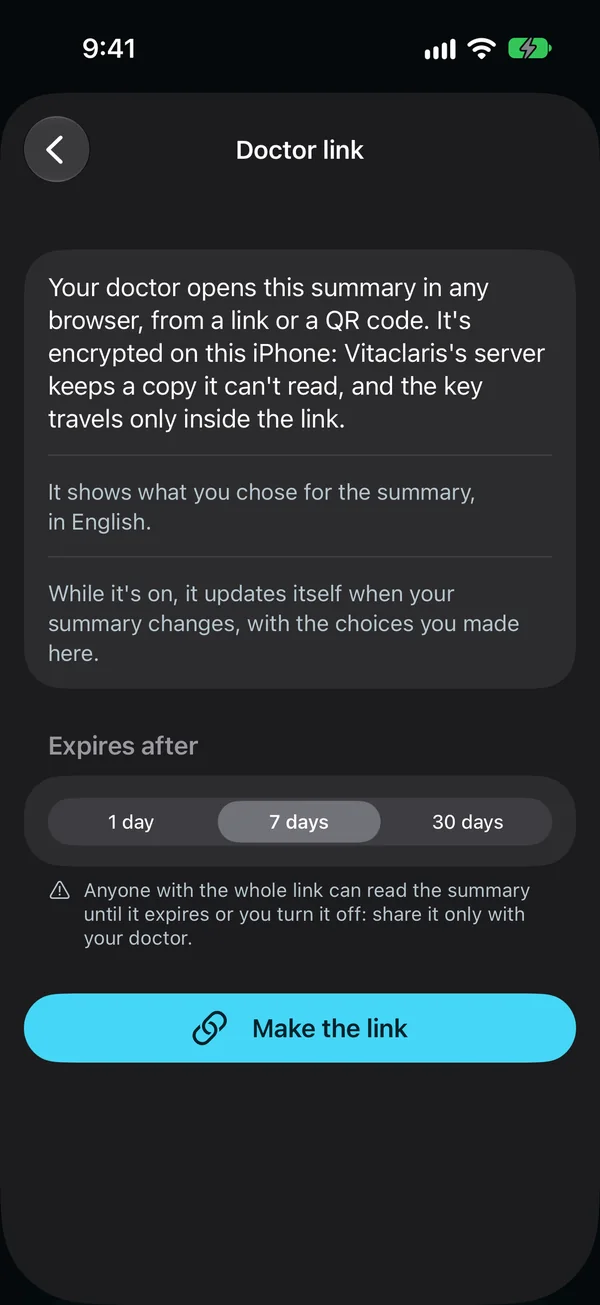
  • His new endocrinologist gets a doctor link that stays up to date, instead of a PDF.
  • When he misses his evening dose, Vitaclaris asks whether he took it.

Questions

Is Vitaclaris free?

Yes. Everything that runs on your iPhone is free, with no time limit: your records, medications, visits, the doctor link, family profiles, the programs, the estimates, your plan and the AI on your iPhone. Vitaclaris Plus adds Claude for $9.99 a month or $79.99 a year, with a free week the first time. Cancel at any time in your iPhone's Settings.

What can the AI do?

On iPhones with Apple Intelligence, some things are written right on the phone, for free, and nothing leaves it. With Vitaclaris Plus, Claude reads your documents, explains results, reports and medications, prepares your visits, summarizes a recorded visit and answers questions about your own health. See everything it does.

Can I keep my mom's or my child's records?

Yes. Add a family profile for each person you care for, with their records, medications and visits, in your own Vitaclaris. Share a profile with family so everyone sees the same thing, and get an alert when a dose is missed. The Health app from Apple stays yours alone.

What are blood age and the heart risk estimate?

Estimates from published research, from results you already have: blood age uses a research formula (PhenoAge) with nine routine blood values and your age, for adults from 20 to 100, and the 10-year heart risk estimate uses the PREVENT equations, made for ages 30 to 79 without a past heart or blood vessel problem. They aren't medical tests: ask your doctor what they mean for you.

Where does my health information go?

It stays on your iPhone and iPad. If you turn on sync, your devices share an end-to-end encrypted copy that only your devices and your recovery key can open. When you use an AI feature, what it needs goes through our server to Anthropic's Claude, and our server keeps none of it. See everything that leaves your device.

Which doctors and hospitals does it work with?

Any of them: add a lab report or a letter as a PDF or a photo, in any language, and with Vitaclaris Plus, Claude reads it into results and to-dos. In the US, the UK and Canada, Vitaclaris can also read the records your hospitals, clinics and labs send to the Health app from Apple. Apple's directory lists more than 18,600 US hospitals, clinics, practices and labs.

Is it in Spanish?

Yes. The app, its help and this site are in English and Spanish, and each person in your care circle gets updates in their own language.

Which iPhones and iPads does it run on?

Any that run iOS 26 or iPadOS 26: iPhone 11 and later, iPhone SE (2nd generation) and later, iPad (8th generation) and later, iPad mini (5th generation) and later, iPad Air (3rd generation) and later, and every iPad Pro from 2018 on. Its Apple Watch app needs watchOS 26 or later.

Does Vitaclaris replace my doctor?

No. Vitaclaris shows what your lab reports, with the lab's own flags and ranges, and helps you prepare your questions. What a result means for you is for your doctor to say, and what Claude writes isn't medical advice.

Get Vitaclaris

Download it, hear about what's new, or tell us what you'd like next.

Download

Vitaclaris: Health & Longevity, free on the App Store, for iPhone and iPad.

Download on the App Store
QR code for vitaclaris.com/get
On a computer? Scan this with your iPhone's camera, or go to vitaclaris.com/get.

Get updates

News about Vitaclaris, such as new versions and features.

We use your email only for Vitaclaris's news, never share or sell it, and take you off the list whenever you ask. Privacy Policy

Suggest a feature

What should Vitaclaris do next?

Write a suggestion

Please don't include personal health information. We may use the ideas you send to improve Vitaclaris, without owing you anything for them. Privacy Policy

VitaclarisUpdatesGet the app